Hi, we are trying to automete the process of configure our memor 11. One thing left is the change of “active” ime. Android uses gboard by default, i am looking for the way to use datalogic´s quickboard (we have a custom layout) without user input needed.
We use Omnissa as EMM, the rest of the configuration were done using a tar file and an intent via omnissa´s File/action.
Thanks a lot.
Juan.
Hi Juan,
Welcome to Datalogic’s developer bulletin board.
As you’ve already figured out, Omnissa Workspace ONE doesn’t automatically convert intents from ADB to its own format. You’ve also correctly worked out that you can set IME settings with Scan2Deploy. I think you’ve already figured out how to configure QuickBoard keyboards. The method to set QuickBoard as the default IME is not so clear. This is how I do it:
- Open your profile in Scan2Deploy Studio.
- If “Device and Scanner Settings” is not yet enabled in the Actions tab, go ahead and enable it.
- I assume you’ve already enabled and configured your QuickBoard custom keyboard already, so leave it configured just as you already have it.
- Configure “Device Settings” to enable QuickBoard:
a. Click the “Device Settings” tab.
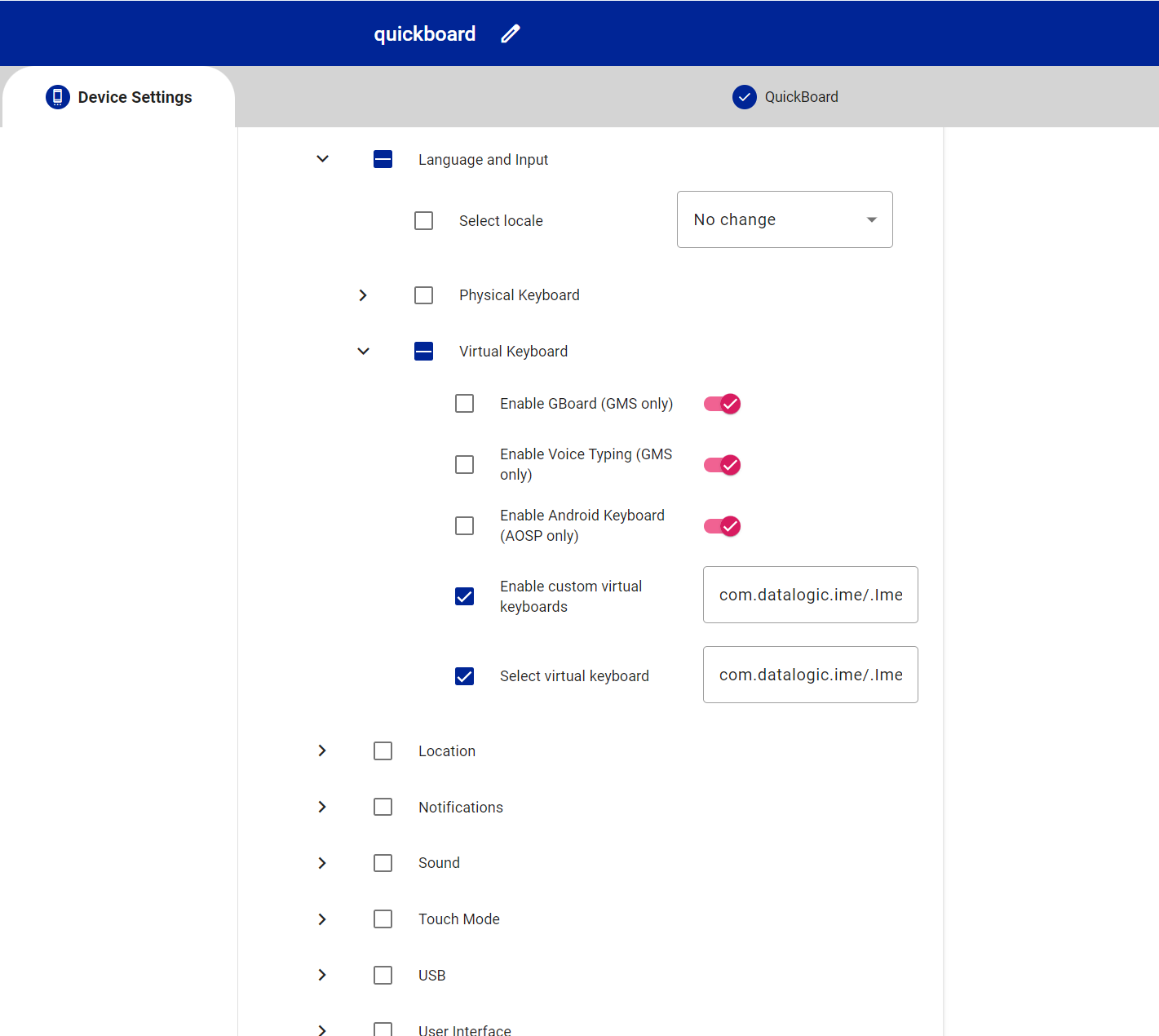
b. Click the disclosure arrows to disclose “System Settings / Language and Input / Virtual Keyboard”.
c. Type “com.datalogic.ime/.ImeService” in the “Enable custom virtual keyboards” field. (This will also automatically check this parameter and all the headings above it.)
d. Type “com.datalogic.ime/.ImeService” into the “Select virtual keyboard” field. (This will automatically check itself too.)
- Click the Save tab and save your profile.
- Carry on just as you were doing, but now with these parameters set.
Let us know if this works for you or not.
Good luck,
Scott
Mobile Products L3 Specialist Support Engineer, Datalogic
1 Like
Thanks Scott, i will try and come back later.
Hi Scott, already done without success.
I made the above changes along with other related to scanner and a new quickboard design. Then export the proyect and deliver via worspace one using the intent that s2d suggest. The symbology options and the quickboard layout get configured correctly, but the default input method didn´t change.
On other side, to archive this i need to send the scan2deploy apk just before the intent via WS1 “file action”, for any reason the scan2deploy is not avaible after enrollement using " Android Enterprise QR Code Generator" tool.
Thank you a lot.
Juan.
1 Like
Hi @juan_lopez_villalta,
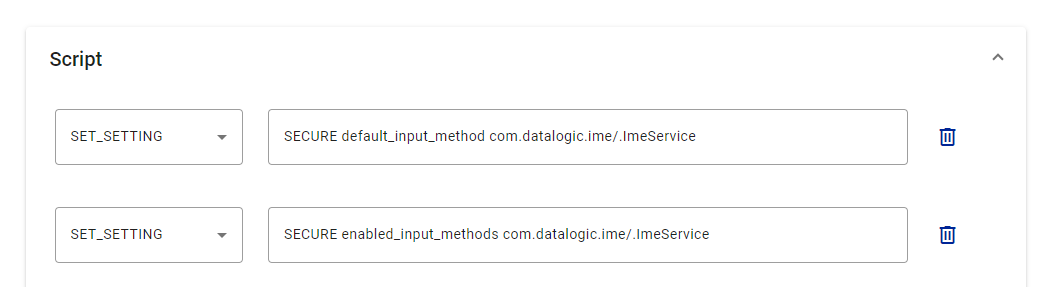
Maybe try the script section to configure the ime. That seems to work better for me:
Gr Peter
2 Likes
Thanks Peter, seems to work now.
2 Likes