Hello,
we currently try to configure our Memor 12 devices via Intune MDM.
At first we tried to use the Intune built-in kiosk mode, but after some issues we shifted our focus to deploying a kiosk experience using the Datalogic launcher.
After initial success, we discovered that the home button disappeared, and the settings for enabling the status bar and the overview button have no effect.
Only when applied via Intune policy, the settings do not work, but when the device is not enrolled and set up manually, the settings do work.
Device Firmware version: 3.12.006.20250924
Launcher Version: 1.6.0.25
1 Like
Hi Noah,
By the “home button,” do you mean the circular button at the bottom of the screen that would take the user to the Home screen or back to the Launcher window if they’re running Launcher? If so, then we have a known defect where the buttons in the Navigation bar start out gray, with a healthy contrast from the background color, but then after the screen turns off and the user resumes, the navigation buttons are a very low contrast that some users just don’t see or notice. Our Tools Team is aware of this defect, but I can’t promise a date when it will be fixed.
Thank you for your patience,
Scott
Mobile Products L3 Specialist Support Engineer, Datalogic
1 Like
Hi Scott,
we encountered the bug you described, but this isn’t our actual problem.
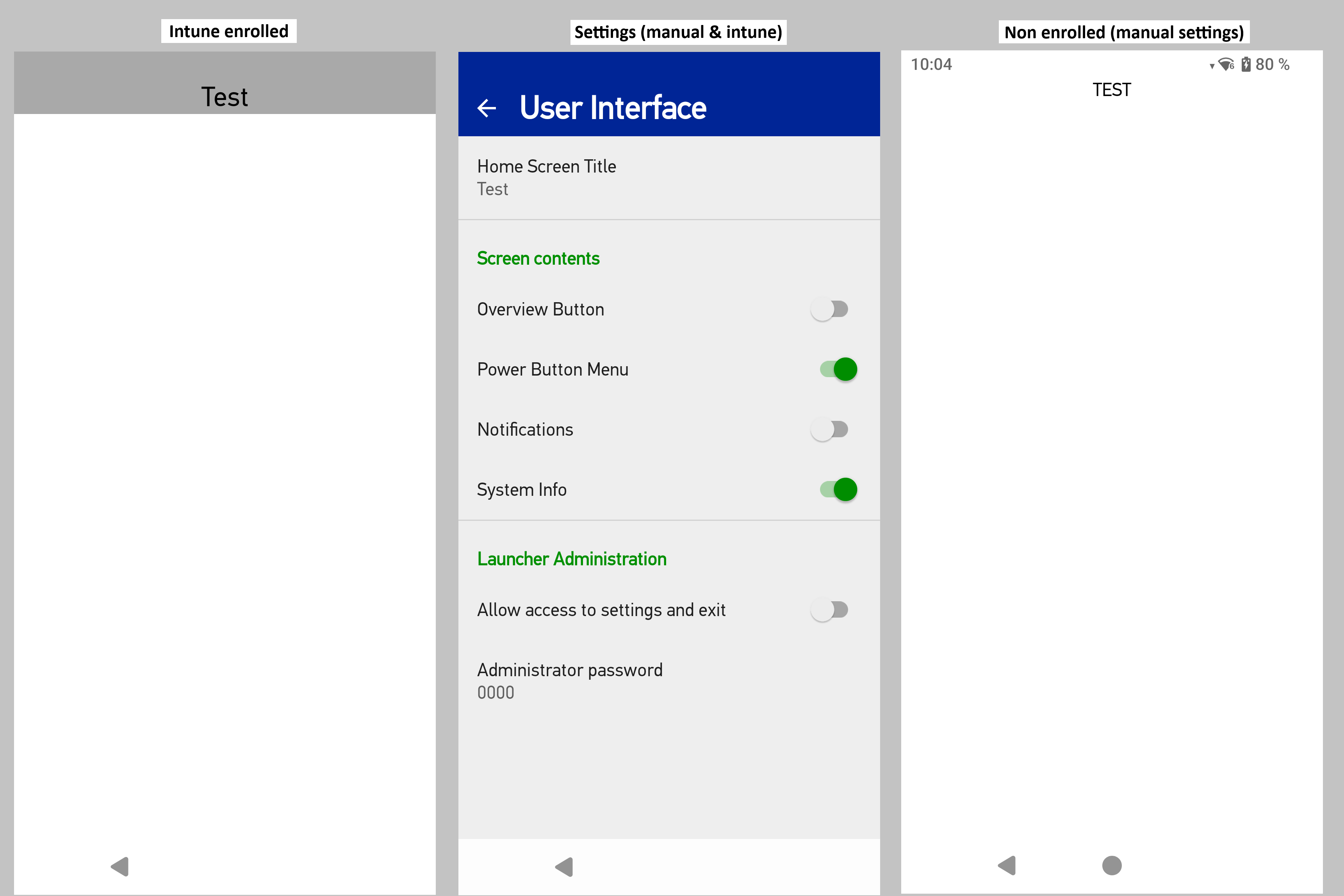
Following are a few screenshots for better understanding:
Notice that the Intune enrolled devices are missing the status bar and the home button. Even if we enable the override mode and set the settings manually on the Intune devices, they won’t show.
Hi Noah,
Sorry, but I missed your next question a few months back. I think the problem may be in your device restrictions.
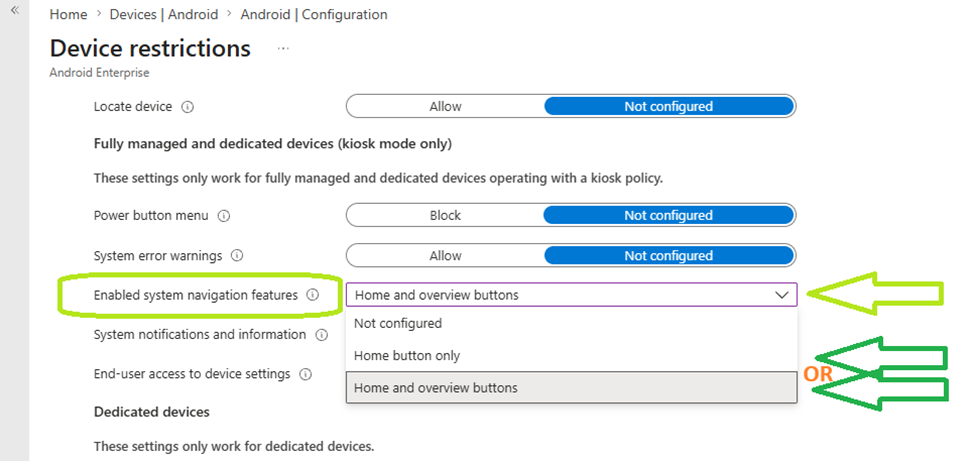
Enable System Navigation: In the Intune admin center, go to Devices > Configuration Profiles > Device restrictions > General and set Enabled system navigation features to “Home and overview buttons” or “Home button only”.
Reading back on this thread, I think I may have misread your original request. We do have a known problem with the navigation buttons drawing too faintly in some application modes, and this isn’t fixed yet, but Intune’s control of device restrictions can also cause these controls to be hidden altogether. I’m sorry I didn’t think of that last year.
Please let me know if you have any more questions, or if you think I didn’t understand your question in the first place.
Good luck,
Scott Kucera
Mobile Computers Specialist Support Engineer
Hi Scott,
Sadly, this does not help.
You should also know that the symptoms described only appear after launching and while using the Datalogic Launcher. The bigger pain point is actually the status bar, as the user cannot see the time or battery status.
I understand that the issues only appear after launching and while using the Datalogic Launcher. Unfortunately, this is a known behavior and there is no way for us to remedy it from our side.
Datalogic Launcher utilizes the kiosk mode defined by Android, and you will find this behavior with any launcher that utilizes Android kiosk mode.
Intune, unlike any other MDM, takes control of the Kiosk settings, whether you are using built-in kiosk mode or not. The steps I provided before is the solution. It works in my testing and is what many customers have used to overcome this problem.
Please make sure you configure the two settings I had mentioned. Enable system navigation features and System notification and information.
Then make sure that profile has been applied to your device, applying profiles can take some time with Intune.
If configuring those settings has no impact on your device, then please feel free to file a technical support request at Technical Support - SUBMIT AN ON-LINE REQUEST. Feel free to mention my name and that I’ve been trying to help you on the developer forum. You may also wish to file a technical support request with Microsoft. Please feel free to request that we join the Intune tech support call with you.
Good luck,
Scott Kucera
Mobile Computers Specialist Support Engineer
1 Like