I have some X5 skorpio with andriod 10 on them. How I can access andriod 14 for them?
Is there seemless upgrade using scan2depoly option, where scan barcode and upgrade OS files get downloads automatically (I saw Zebra MC93, where they scan barcode and it downloads latest andriod 14). Help is appreciated
Hey @Rao_Thakur! I came here looking for the answer to the same question and ended up figuring it out. I downloaded the latest firmware package for the Skorpio X5 from the Datalogic Developer Portal, along with the Espresso Extension found here: Skorpio X5 - Android - Firmware - Products - Datalogic Developer Portal. Their latest firmware package is for Android 13, not 14, that will at least get your device to an Active Support Status. Make sure to download “Skorpio X5 Android 13 GMS v4.08.001_FULL” along with the corresponding EspressoExtension.
Next, I performed a manual file transfer from my computer to the SX5 device and performed a local system update found in Settings > System > System update. I performed the firmware update first followed by the Espresso Extension once the device rebooted. This updated my Android version from 10 to 13. Hope this helps!
1 Like
Hello @Rao_Thakur,
Thank you for your question. As @Joshua_De_Geus correctly explained, the Skorpio X5 currently supports Android 13 as its latest version, not Android 14.
Datalogic Shield contract and Shield Support Statuses
Updates for Datalogic Android devices are governed by the Datalogic Shield contract, which defines the security support lifecycle for our devices, including regular firmware updates with monthly security patches through Zero Latency, bug fixes, and Android major version upgrades. Shield coverage extends throughout the entire product line lifecycle plus at least 2 years after the product line reaches its End of Life, ensuring long-term protection for your investment (for more details, see our Shield FAQ).
Throughout a device’s lifecycle, Datalogic Shield defines different support statuses that determine the type and frequency of updates your device receives. These statuses depend on two key factors: whether Google/chipset vendor support is still active, and whether a newer Android version has been released for that specific device model.
- Active: The device is on the latest Android version available for that model, with full Google/chipset support. Updates are delivered with Zero Latency (monthly security patches within the same month Google publishes them).
- Transition: A newer Android version has been released for the device, but the previous version still receives Google/chipset support. Updates continue for 1 year while customers are encouraged to upgrade to the newer version.
- Active - Variable Frequency: The device is on its last supported Android version (no newer version will be released), but Google/chipset official support has ended. Datalogic continues providing security patches through backporting on a case-by-case basis, carefully evaluating each vulnerability.
- Transition - Variable Frequency: Similar to Transition, but after Google/chipset support has ended. A newer Android version exists for the device, and updates continue with variable frequency.
- Expired: The Shield contract period has ended. No new updates are provided, but existing patches remain available for download.
You can view detailed information about all support statuses in the Shield Support Status document, and check the current status for each device’s Android version on its firmware download page, where a table at the top displays the status for each operating system.
Datalogic’s strategy regarding Android versions
For our device roadmap, Datalogic carefully evaluates which Android versions provide the most value for enterprise deployments. In cases where a new Android version doesn’t introduce significant enterprise-focused features, we may strategically skip it to focus on versions with longer support lifecycles. For example, our newer devices like the Memor 30/35 family and others moved directly from Android 13 to Android 15, which will receive Google security patches until February 2028, maximizing device longevity and security coverage.
Skorpio X5’s Android versions
The Skorpio X5’s maximum supported Android version is Android 13. It will not receive Android 14 or Android 15 upgrades due to platform limitations. You can check the current support status for each Skorpio X5 Android version on its firmware download page.
Status of Shield support for Skorpio X5 firmware (as of October 2025):
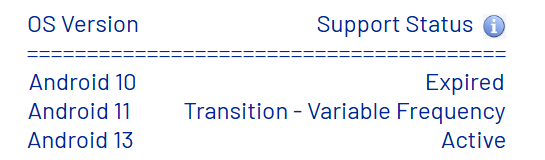
While Google’s official security support for Android 13 ends on January 31, 2026, the Skorpio X5 will transition from Active status (currently receiving monthly Zero Latency updates) to Active - Variable Frequency status. During this extended period, Datalogic’s Shield program will continue providing security patches through careful backporting. The Shield Security Releases document provides estimated termination dates for security patch support for each device; for the Skorpio X5, support is estimated to continue until April 2029—more than 3 years beyond Google’s official support.
Regarding the firmware upgrade process
Beyond the practical manual method Joshua described, you have additional options:
-
Scan2Deploy: Download the firmware from the Developer Portal and use Scan2Deploy to deploy the update, through the System Update feature:
-
EMM automation: If you use an Enterprise Mobility Management solution, you can automate the process by deploying the firmware file to devices and triggering the update via Android intent
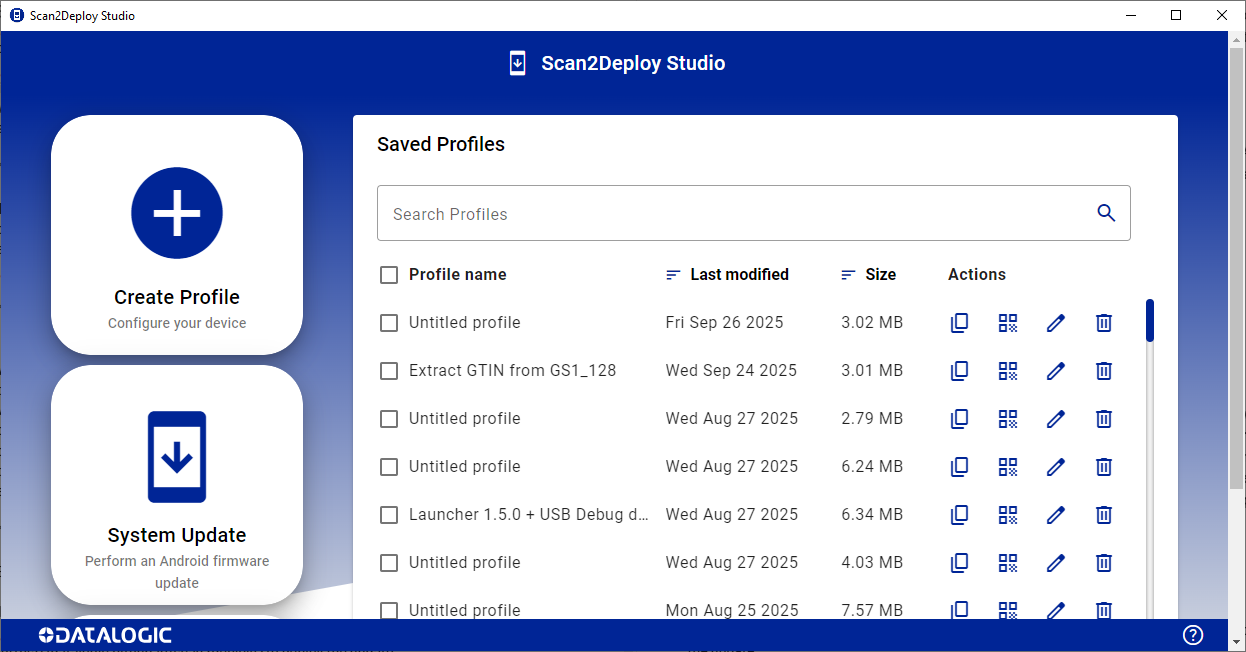
Important note: When upgrading between major Android versions (e.g., Android 10 to 13), you must use a full OTA update, not an incremental update. Scan2Deploy is excellent for configuration and deployment, but major OS upgrades require the full firmware package.
If you have an active Shield or EaseOfCare contract, you’ll continue receiving security updates and firmware improvements throughout the device’s supported lifecycle.
Would you like more detailed information about any of these upgrade methods?
Simone Callegari
SW Engineer - Mobile Computers L3 Support | Datalogic