Hello, we are validating Skorpio X5 for integration into our system.
When I try to connect with Vysor and the Launcher is active, the notification to allow the connection doesn’t appear on the screen. Is it possible to display that notification on the Launcher?
Hello @Nacho_Bailly-Bailli1
Datalogic Launcher is an Android application used to lock down the device so that only approved applications can be launched.
The type of special permission request triggered by Vysor usually belongs to Android permission sets that, in managed environments, are pre-granted by the Device Owner to applications installed via an EMM and managed through the Device Policy Manager.
In test labs or during development, these permissions can typically be granted via ADB
If neither of these approaches is applicable, even though such a permission request may look unusual to the end user, Datalogic Launcher allows you to whitelist the package name that is invoked by the system to request the permission and that is currently being blocked.
There are two ways to do this:
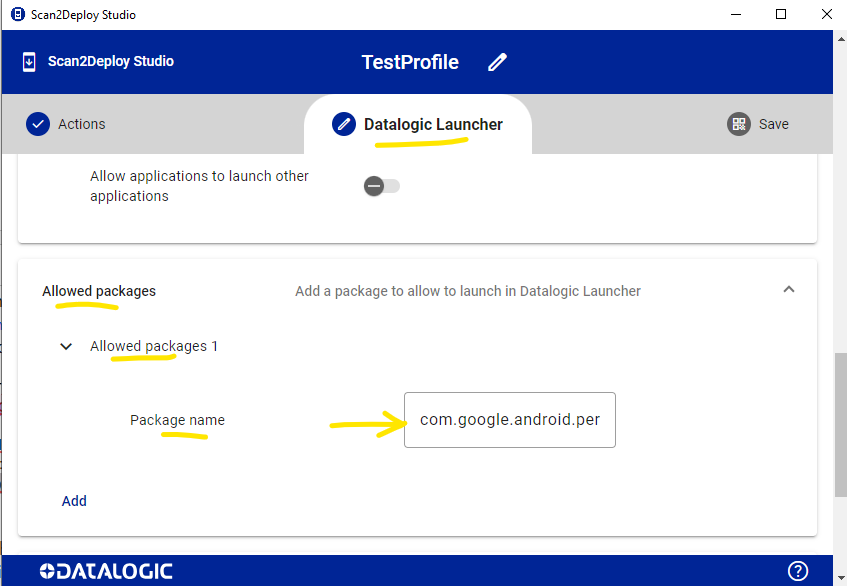
1) Using Scan2Deploy
Open the Datalogic Launcher configuration page and locate the “Allowed Packages” section.
Here you can specify the name of the service or package that is being blocked.
If you do not know the package name, you can use adb logcat to capture the system log.
When you attempt to launch Vysor and trigger the system permission request (which is intercepted), you will see one or more log entries similar to the following:
E ActivityTaskManager: Attempted Lock Task Mode violation r=ActivityRecord{d0123456 u0 [com.package.name]/[com.package.request.or.permission]}
From this entry, you can identify the package name(s) that need to be added to the Datalogic Launcher whitelist.
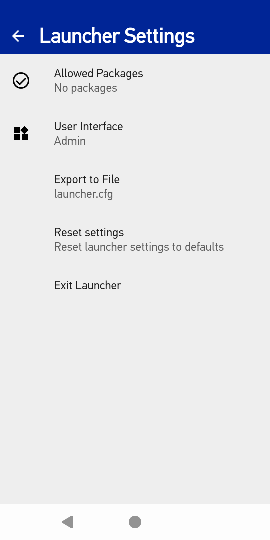
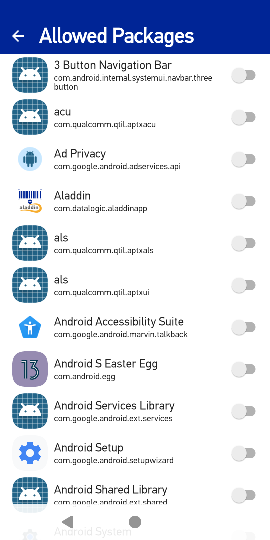
2) Using the Datalogic Launcher UI
Alternatively, you can use the Datalogic Launcher UI directly.
From the Allowed Packages menu, you can manually select the required package(s) from the full list of applications installed on the system.
Simone Callegari
SW Engineer - Mobile Computers L3 Support | Datalogic