Method 3 (ENABLE_SCANNER propertyID):
To simplify enabling and disabling the ScanEngine at runtime, Datalogic added an atomic ENABLE_SCANNER PropertyID with SDK v1.39. This allows you to enable or disable the ScanEngine at the system level.
Through the use of classes ConfigurationManager and PropertyID of the Datalogic SDK, or via Intents (see action “ACTION_CONFIGURATION_COMMIT“ offered by the Intents class) You can set the ENABLE_SCANNER property to false to disable the ScanEngine, or to true to re-enable it.
REMARK: On all the devices running firmware versions that include SDK v1.39 or later, this should be the preferred method for enabling or disabling the ScanEngine.
To manipulate ENABLE_SCANNER property, there are several options:
-
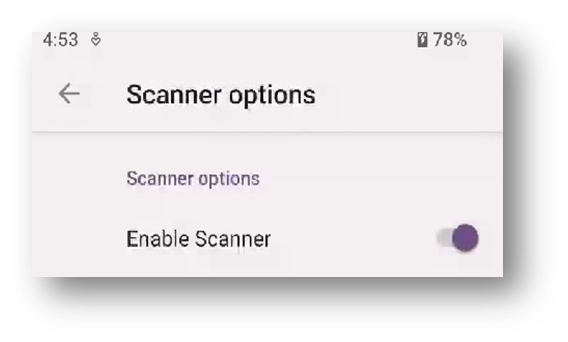
Option A - Through “Datalogic Settings” menu on the Device UI, under “Scanner Options”
-
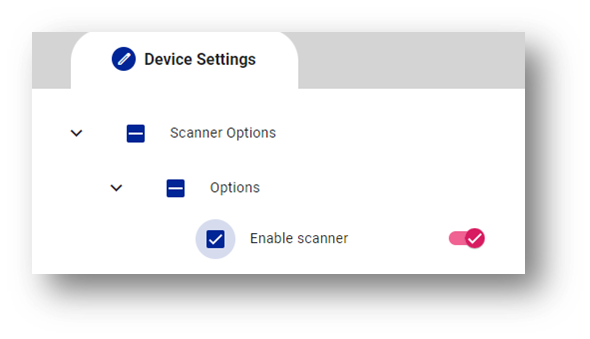
Option B -Through Scan2Deploy or MDMs:
-
Option C - Via code using Datalogic SDK (BarcodeManager class):
//Java BarcodeManager bcm = new BarcodeManager(); bcm.getPropertyById(PropertyID.ENABLE_SCANNER).set(false); bcm.commit(); -
Option D - Via code using Intents and Datalogic SDK for keywords definitions:
//Java Intent intent = new Intent(Intents.ACTION_CONFIGURATION_COMMIT); HashMap map = new HashMap(); map.put(PropertyID.ENABLE_SCANNER, “false”); intent.putExtra(Intents.EXTRA_CONFIGURATION_CHANGED_MAP, map); mContext.sendBroadcast(intent); -
Option E - Via code using Intents and literal strings only:
//Java Intent intent = new Intent(”com.datalogic.device.intent.action.configuration.COMMIT”); HashMap map = new HashMap(); map.put(”ENABLE_SCANNER”, "false"); intent.putExtra(”com.datalogic.device.intent.extra.configuration.CHANGED_MAP”, map); mContext.sendBroadcast(intent); -
Option F - Sending intents via ADB (e.g.: for testing):
//bash
adb shell am broadcast -a com.datalogic.device.intent.action.configuration.COMMIT --es com.datalogic.device.intent.extra.configuration.CHANGED_MAP 'ENABLE_SCANNER=false’
SDK Reference:
- ENABLE_SCANNER propertyID
- ACTION_CONFIGURATION_COMMIT action (from Intent Class)
Related Articles:
- How to use Datalogic Intents to star/stop the Scan Engine
- Configure Intent Wedge by Intents
- Receive barcodes through Intent Wedge broadcast receiver
Simone Callegari
Datalogic Mobile Products Specialist - L3 SW Engineer